
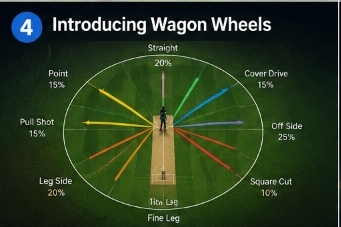
Understanding where you score runs is essential for improving your batting. In our latest update, CricsApp introduces **Wagon Wheels**—a feature that maps every scoring shot directly onto an interactive, 360-degree virtual outfield. You can now track your scoring zones and identify areas to target during training.
How the Wagon Wheel Works
When scorers record runs, they tap the direction on a virtual field map. The app then processes this data to provide several key analysis features:
- Interactive Filters: Filter your wagon wheel by singles, doubles, boundaries, or wickets to analyze your scoring patterns.
- Pitch Selection splits: Filter by spinner vs fast bowler deliveries to see how your shot selection varies based on speed.
- Cold Zone Identification: Locate areas on the field where you score less than 10% of your runs, highlighting gaps to address during net practice.
"Visualizing shot placement turns raw scoring numbers into a tactical field map, helping you find and exploit gaps in the opposition field."
Accessing Wagon Wheels
The feature is live on the CricsApp dashboard under the **Analytics** tab. Scoring data from previous matches will automatically sync to generate wagon wheels. Open your stats profile to review your scoring zones and start building your custom training drills today.